Double Take
gamefinity.io
Five scenes with five differences each: tap what changed before the clock runs down.
- New puzzle
- UnlimitedPlay as often as you like
- Category
- Visual
- Price
- FreeNo account needed
- Plays on
- Phone and computerIn the browser, nothing to install
- Site
- gamefinity.io
- Link checked
- Nov 2, 2026
About Double Take
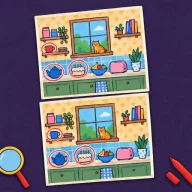
Double Take shows two versions of a bright illustrated scene, and five details differ between them. You tap or click any spot that differs, on whichever picture you like, to mark it. Find all five and the next scene loads, and the goal is to clear all five scenes while time remains.
Accuracy matters as much as speed, because each wrong tap takes 5 seconds off the clock. Hints are available when you are stuck, and you decide when to use them. Double Take is not a daily puzzle; you can replay it whenever you like, as many times as you want.
How to play
- Compare the two pictures and look for anything that has changed.
- Tap or click each difference you spot, on either image, to mark it.
- Use a hint, or press H on a keyboard, if you get stuck.
- Find all five differences in each of the five scenes before time runs out.
Tips
- Scan one section at a time, comparing the same corner on both pictures, instead of glancing at the whole scene.
- Avoid tapping on a hunch, since a wrong tap costs five seconds that you could spend looking.
Time and controls
A round takes about 3–5 minutes. Tap a difference on a phone or click it on a computer; press H on a keyboard for a hint.