Unoverse
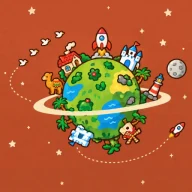
Each day you get one figurine to set down on a small shared planet, from a cottage to a moon base, then zoom down to street level to see what others placed.
- New puzzle
- DailyReset time shown in your time zone
- Category
- Other
- Price
- FreeNo account needed
- Plays on
- Phone and computerIn the browser, nothing to install
- Site
- gamefinity.io
- Link checked
About Unoverse
Unoverse is less a game than a shared toy. Each day’s planet first appears as a snow globe sitting on a shelf; keep zooming and the glass melts away until you are among the rooftops, then choose one of over 400 painted figurines, anything from a cottage or a lighthouse to a camel or a moon base, and set it on the spot you pick. That one placement is your share of the day.
Every day brings a new world, a meadow, a ring of islands, dunes, an autumn or a night sky, and figurines respond to whatever stands next to them: houses placed together get paths between them and become a village, and trees in a group become a wood. Milestones such as gulls, a moon and fireworks arrive as the count climbs. There is no score; after your one thing you can explore the planet, replay the day as it filled up, or look back at past planets. A new planet begins at midnight New York time.
How to play
- Zoom into the snow globe until you reach the planet’s surface.
- Browse the drawer and choose a single figurine.
- Touch the planet where it belongs, add a paint if you wish, then confirm.
- Then explore: fly around the day’s planet, like what others built, or replay the day.
Tips
- Get close before you commit: at street level you can choose a neighbor for your figurine.
- Start with the Today drawer: its figurines are chosen to fit the day’s world, and the first is a rare one nobody pays for.
Time and controls
A round takes about 1–2 minutes. Phone: pinch to zoom in and out, swipe to turn the planet, tap to pick and set down. Computer: the scroll wheel zooms, dragging turns it, and the arrow keys work too.